

A free pre-call planning template that Claude fills in before every call
Add the free Arrows Sales Skills to Claude and it finds the call on your calendar, reads every prior call, email and chat with the buyer, and gives you a brief you can read in 60 seconds before you join.
Get it running in 3 steps
Free, with no signup and no email gate.
Step 1: Add the free Arrows Sales Skills to Claude
In Claude Desktop, open Settings, then Connectors, then Add custom connector. Name it Sales Skills by Arrows, paste https://skills.arrows.to, click Add and restart Claude. Prefer files? Download the skill’s SKILL.md from GitHub and upload it under Settings, then Skills.
Step 2: Connect your CRM, email, calendar and call recorder in Claude
Turn on the Claude connectors for the tools your team uses. The more it can read, the better the read. Your calendar matters most here: it’s how it finds the call. No calendar connector? It asks once for the date, time and attendees.
Step 3: Run it before the call, or have it ready every morning
Once the skills are added, type the prompt below in Claude, with your buyer’s company in place of Globex. (In a Claude without the skills, the same words just get a generic answer.) It finds the next meeting with that company over the next 14 days. Leave the company out and it preps your next sales call. On the first run it offers to prep each external call every weekday at 7am. Run “Build my sales profile” once first (about 5 to 10 minutes) and it uses your own stages and methodology. Without a profile it still runs, with stages straight from the CRM.
With the skills added, type in ClaudeRun the Arrows meeting prep for Globex
What’s in the report
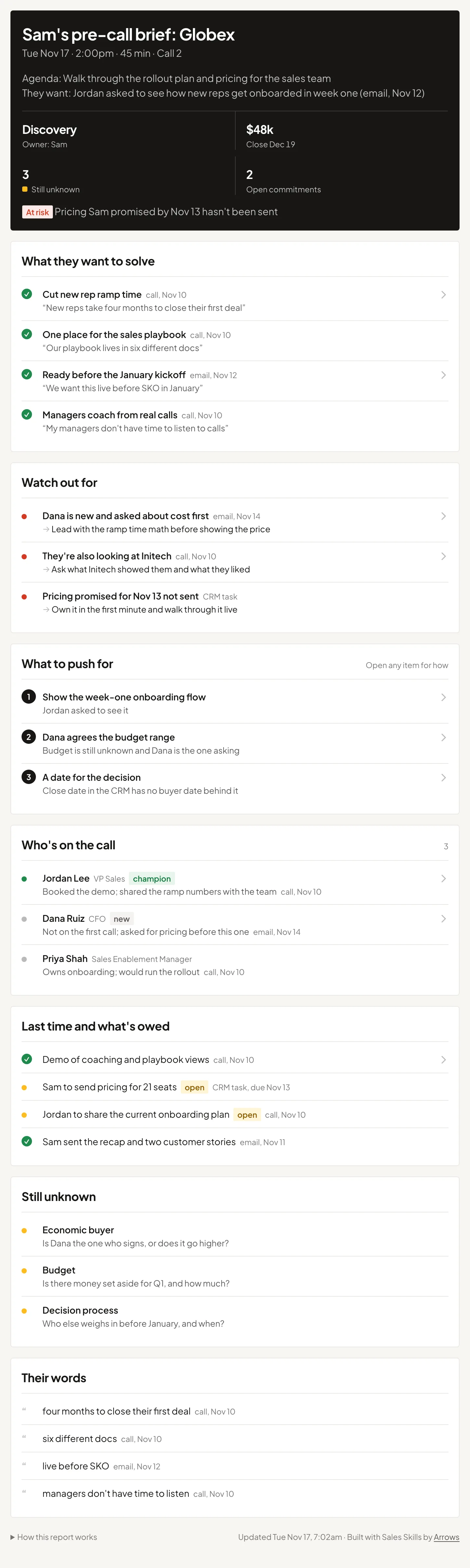
One page for one call, built to be read in 60 seconds right before you join. It fills in the same template every time, in this order, so you find things in the same place before every call. A first call with no history may only show a few sections, and that’s right. Every line names where it came from.
- 1
The header
The call, the time and which call number this is, the agenda and what the buyer asked to cover, the deal’s stage, amount and close date, how many gaps and open commitments there are, and why the deal is at risk if it is.
- 2
What they want to solve
Their pain, goals and numbers in their own words, gathered across every call and email, not just the last one.
- 3
Watch out for
Real risks with a source, like a competitor that came up, a promise not kept or a new stakeholder, each with how to handle it.
- 4
What to push for
Two to four things to leave the call with: a date, a name, a number or a yes. Each opens into numbered steps on how to get it.
- 5
Who’s on the call
Each attendee’s role on the deal, flagged new, skeptic, champion or decision maker only when a call or email backs it up.
- 6
Last time and what’s owed
What happened before, and commitments still open on either side, checked so nothing a teammate already answered shows as owed.
- 7
Still unknown
The gaps against your qualification method that matter at this stage, like the economic buyer, each phrased so it turns into a question on the call.
- 8
Their words
Three to five phrases the buyer used, to echo on the call.
- 9
How this report works
What each section means, what it read this time, and any source that was missing.
How it decides what matters for this call
It reads broadly, then keeps only what helps on this call. Checking the deal against your own sales process is what turns a recap into prep.
| Rule | What it means |
|---|---|
| What it reads | The CRM deal and each attendee’s record, notes and recent activity; summaries of every prior call with the company and the full transcript of the latest one or two; email threads with each attendee from the last 90 days; chat and contracts if connected; and a quick web look at attendees with no history. |
| First calls aren’t a blank slate | For a first call it reads the booking form, the intro email and any SDR handoff notes closely. Buyers often state their goal or timeline there, and it’s forgotten by call time. |
| Gaps against your method | For each element of your qualification method (MEDDIC, SPICED, BANT or your own), it decides from the evidence whether it’s known, partly known or unknown. Unknown items that matter at this stage become “Still unknown.” No profile? It checks budget, decision maker, timeline, the problem and competition, and says so. |
| Your best-deal moves | If your profile lists what you do on your best deals, it suggests the one that fits this call, and flags anything from your “what slips” list that applies to this deal. |
| At risk | No two-way touch in 14 or more days, no next step, or a promised next step that didn’t happen. If any is true, the header says so. |
| Every fact has a source | Each line traces to the CRM, a call, an email, chat, a contract or the web. If it can’t point to a source, it leaves the line out. |
- It’s read only. It never updates the CRM, drafts or sends anything to the buyer, or sets up a scheduled run without your yes.
- The brief is for you, not the buyer. It isn’t an agenda to send.
Use it right before you join
- 1
Run it a few minutes before the call and read the header and what to push for first.
- 2
Open what’s owed: if you owe something, say so in the first minute.
- 3
Turn one “still unknown” item into a question you ask on the call.
Pre-call planning: how to prepare for a sales call, the first one and every one after →
When you want more than a report
A report tells you what’s wrong. Arrows lets you act on it.
- During the review, a leader talks an action into a deal, and Arrows queues it on the deal’s gameplan.
- Arrows runs your team’s Agentic Playbook on every deal, without anyone typing a prompt.
- Reps review and send the drafts it prepares: follow-ups and CRM updates.
- Next week, you can see whether it got done.
Arrows is its own product, not part of Claude. Your team can keep using Claude alongside it.
Every tool. Every deal. No prompts.
An Agent Architect connects your stack and sets what Arrows can do in each tool. Then Arrows does the follow-through on every deal, and your reps approve what matters.
Book an agent kickoffPre-call prep: common questions
Is there a free pre-call planning template for Claude?


Yes. The Arrows pre-call prep is a free Claude skill that fills in the same one-page pre-call brief before each call, from your calendar, CRM, calls, email and chat. Add the free Arrows Sales Skills to Claude first (connector at skills.arrows.to), then type “Run the Arrows meeting prep for” and the buyer’s company. There’s no signup and no email gate.
Do I need to install anything to use it?
Yes, the skills themselves. Add the free Arrows Sales Skills to Claude first: in Claude Desktop, go to Settings, then Connectors, add a custom connector with the URL https://skills.arrows.to, and restart Claude. Or upload the skill file from GitHub under Settings, then Skills. Without the skills, typing “Run the Arrows meeting prep for Globex” only gets a generic answer, not this brief. Then connect your calendar, CRM, email and call recorder so it has something to read.
What should a pre-call plan include?
What the call is for, who’s on it and their role on the deal, what the buyer wants to solve in their own words, what happened last time and what’s still owed on both sides, what you still don’t know for your qualification method, two to four outcomes to push for, the real risks with how to handle each, and the buyer’s own phrases. That’s the template this skill fills in.
How do I prepare for a first sales call with no history?
Start from what the buyer already told you: the booking form, the intro email or the SDR handoff notes often state the goal or timeline. For a first call the brief is shorter on purpose: who’s on the call, what to push for, and what’s still unknown, which is most of discovery. Our pre-call planning guide covers both first and later calls.
How does it find the right call?
It looks at your calendar for meetings with the company you named over the next 14 days and matches each to a CRM deal. If there’s one match, it goes straight on and names the call in the header. It only asks when the company has meetings for different deals, like two business units. Name no company and it preps your next sales call, skipping vendor, recruiting and personal meetings.
Can it prep my calls automatically every day?
Yes. On the first run it offers to prep each external call on your calendar every weekday at 7am, if Claude can create scheduled tasks for you. It only sets that up after you say yes. The Arrows Sales Skills need to be added to Claude first.
Does it change my CRM or email the buyer?
No. It’s read only. It doesn’t update the CRM, draft or send anything, and the brief is for you only, not the buyer. After the call, the Arrows post-call skill drafts the follow-up and the CRM update for you to approve.
More free sales skills
For sales leaders
- Weekly pipeline reviewOne shareable page: what’s moving, what’s at risk, what to do this week. Leaders get a rollup by rep.
- Objective forecastWhat’s really going to close and when, judged from what buyers said and did, next to the CRM’s number.
- Process gaps reportWhat’s falling through the cracks: money at risk, missed follow-ups, and this week’s moves.
- CRM hygiene checkLearns how your pipeline really works, then keeps your CRM clean with fixes from your calls and email.
- Win-loss analysisWhy you win and why you lose, from your closed deals: the moves that win, the real loss reasons, and 3 things to change.
- Sales methodologyPuts MEDDPICC, BANT, SPICED, or your own process into Claude, then shows which wins followed it and which deals don’t.
- Agentic playbook builderFor sales leaders: writes down how your team runs its sales process, play by play, from your real deals and calls.
For reps
- SetupLearns how you sell from your CRM, calls, and email. Run this first.
- Daily briefYour day, what changed since yesterday, and what to do first.
- Post-callWrites your follow-up and updates the CRM from what was said, after you approve.
- Deal nudgeFinds deals at risk and drafts a short nudge for each, in your voice.