

A free daily brief that tells you what to do first each morning
Add the free Arrows Sales Skills to Claude and it reads your calendar, CRM, calls, email and chat, then builds a short brief you can read on your phone before the first call.
Get it running in 3 steps
Free, with no signup and no email gate.
Step 1: Add the free Arrows Sales Skills to Claude
In Claude Desktop, open Settings, then Connectors, then Add custom connector. Name it Sales Skills by Arrows, paste https://skills.arrows.to, click Add and restart Claude. Prefer files? Download the skill’s SKILL.md from GitHub and upload it under Settings, then Skills.
Step 2: Connect your CRM, email, calendar and call recorder in Claude
Turn on the Claude connectors for the tools your team uses. The more it can read, the better the read. The calendar matters most here: without it, the brief skips today’s calls and open time. No CRM connector? It builds the deal view from email, calls and calendar, or you can paste a CSV export of open deals.
Step 3: Run it, or have it waiting every weekday morning
Once the skills are added, type the prompt below in Claude. (In a Claude without the skills, the same words just get a generic answer.) If Claude can create scheduled tasks for you, it offers to have the brief ready every weekday at 7am. Say yes, or give it another time. Run “Build my sales profile” once first (about 5 to 10 minutes) and it uses your own stages and methodology. Without a profile it still runs, with stages straight from the CRM.
With the skills added, type in ClaudeRun my Arrows daily brief
What’s in the report
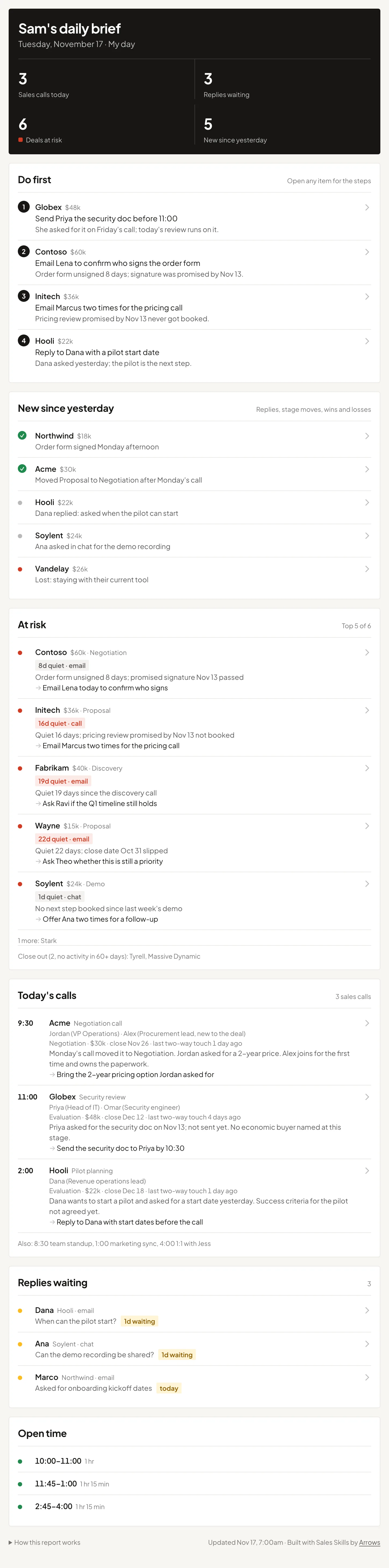
One page, built for a phone and short enough to read in about a minute. It fills in the same template every morning, in this order, so you always know where to look. Open any row for the dated facts behind it and where they came from.
- 1
The header
Sales calls today, replies waiting, deals at risk and what’s new since yesterday. Tap a number to jump to its section.
- 2
Do first
The 2 to 5 things that matter most today, in order. Each names the account and who to contact, says why it’s today, and opens into 2 or 3 numbered steps.
- 3
New since yesterday
Buyer replies, stage changes, wins, losses and signed contracts since the start of the previous working day (since Friday morning on a Monday).
- 4
At risk
Deals going quiet or slipping, worst first, each with the specific reason and one action. Deals with no activity in 60 or more days are named on one close out line.
- 5
Team
For sales leaders: one line per rep, most at risk first, with what’s closing this week and the one thing that needs the leader.
- 6
Today’s calls
Each sales call with who’s on it, where the deal stands, what happened last time and what’s still open, plus one thing to do before the call. Other meetings share one line.
- 7
Replies waiting
Buyers from the last 7 days who wrote last and haven’t heard back, with what they asked and how long they’ve waited.
- 8
Open time
Free blocks of 30 minutes or more. It lists them and stops; it doesn’t plan them for you.
- 9
How this report works
What each section means, what it read this morning, and any source that didn’t load.
How it decides what goes first
It reads today’s calendar, the CRM deal behind each sales call (stage, amount, close date, next step, the last few activities), the latest call summary, email and chat threads with buyers, and up to 150 of your open deals. Then it ranks what’s due soonest: something blocking a call today goes first.
| Rule | What it means |
|---|---|
| Your own list of what slips | With a sales profile, it checks today’s calls and deals against the things you said tend to slip, and those rise to the top of Do first. |
| QuietAt risk | No two-way touch in 14 or more days: a buyer reply, a call or a meeting. It checks email, chat and call history first, so a buyer reply in chat yesterday means the deal isn’t quiet, even if the CRM says otherwise. |
| No next stepAt risk | Nothing set as the next step on the deal. A deal created in the last 14 days isn’t flagged for this. |
| Broken promiseAt risk | A promised next step that didn’t happen: a date passed, a deliverable not sent, a meeting never booked. A contract unsigned for 7 or more days counts. |
| Only what it verified | If there’s no data for a call, it says “No history found” rather than guessing. Actions are specific, like sending a named document to a named buyer before a set time. |
- A close date that has passed on its own counts as slipped, not at risk. It’s mentioned when the deal is at risk for another reason.
- It’s read only. It doesn’t update the CRM, send or draft into your inbox, or create anything without your approval.
Use it to start your day
- 1
Read it on your phone before the first call, Do first at the top.
- 2
Clear the replies waiting before buyers have to ask twice.
- 3
Use the open time for the steps under Do first.
Scheduled tasks in Claude for sales: the setup that runs your morning for you →
When you want more than a report
A report tells you what’s wrong. Arrows lets you act on it.
- During the review, a leader talks an action into a deal, and Arrows queues it on the deal’s gameplan.
- Arrows runs your team’s Agentic Playbook on every deal, without anyone typing a prompt.
- Reps review and send the drafts it prepares: follow-ups and CRM updates.
- Next week, you can see whether it got done.
Arrows is its own product, not part of Claude. Your team can keep using Claude alongside it.
Every tool. Every deal. No prompts.
An Agent Architect connects your stack and sets what Arrows can do in each tool. Then Arrows does the follow-through on every deal, and your reps approve what matters.
Book an agent kickoffDaily brief: common questions
How can Claude prepare my sales day?


Connect Claude to your calendar, CRM, call recorder, email and chat, and add the free Arrows Sales Skills. Then type “Run my Arrows daily brief” and Claude builds one page for the morning: what to do first, what changed since yesterday, today’s sales calls with deal context, buyers waiting on a reply, deals at risk and open time.
Do I need to install anything to use it?
Yes, the skills themselves. Add the free Arrows Sales Skills to Claude first: in Claude Desktop, go to Settings, then Connectors, add a custom connector with the URL https://skills.arrows.to, and restart Claude. Or upload the skill file from GitHub under Settings, then Skills. Without the skills, typing “Run my Arrows daily brief” only gets a generic answer, not this brief. Then connect your calendar, CRM, email and call recorder so it has something to read.
Is this a daily sales report template?
It’s a daily brief for the start of the day rather than an end-of-day report. Claude fills in the same template every morning from your own tools: Do first, new since yesterday, at risk, today’s calls, replies waiting and open time, in that order, so everything is always in the same place.
Can it run automatically every morning?
Yes. If Claude can create scheduled tasks for you, it offers to have the brief waiting every weekday at 7am, or at a time you choose, with the prompt “Run my Arrows daily brief.” The Arrows Sales Skills need to be added to Claude first.
Does it work for sales managers?
Yes. A sales leader gets the same brief plus a Team section: one line per rep, most at risk first, with what’s closing this week and the one deal or decision that needs the leader. The full list belongs in the weekly pipeline review.
Will it change my CRM or send emails?
No. It’s read only. It doesn’t update the CRM, send messages or draft into your inbox without your approval, which keeps it safe to run on a schedule.
What if my calendar or CRM isn’t connected?
It still runs. Without a calendar it skips today’s calls and open time, unless you paste your calendar. Without a CRM it builds the deal view from email, calls and calendar and marks stages as inferred, or you can paste a CSV export of open deals.
More free sales skills
For sales leaders
- Weekly pipeline reviewOne shareable page: what’s moving, what’s at risk, what to do this week. Leaders get a rollup by rep.
- Objective forecastWhat’s really going to close and when, judged from what buyers said and did, next to the CRM’s number.
- Process gaps reportWhat’s falling through the cracks: money at risk, missed follow-ups, and this week’s moves.
- CRM hygiene checkLearns how your pipeline really works, then keeps your CRM clean with fixes from your calls and email.
- Win-loss analysisWhy you win and why you lose, from your closed deals: the moves that win, the real loss reasons, and 3 things to change.
- Sales methodologyPuts MEDDPICC, BANT, SPICED, or your own process into Claude, then shows which wins followed it and which deals don’t.
- Agentic playbook builderFor sales leaders: writes down how your team runs its sales process, play by play, from your real deals and calls.
For reps
- SetupLearns how you sell from your CRM, calls, and email. Run this first.
- Pre-call prepA 60-second brief for one call, gaps included.
- Post-callWrites your follow-up and updates the CRM from what was said, after you approve.
- Deal nudgeFinds deals at risk and drafts a short nudge for each, in your voice.