

Most deals don’t stall because a rep doesn’t know what to do. They stall because the next step lives in someone’s head, a sticky note, or a CRM task nobody opens.
Starting today, Arrows writes it down. Every deal gets a Deal Gameplan: a short, ordered list of what happens next, built from your Agentic Playbook and everything that has happened on the deal so far.
What a gameplan looks like
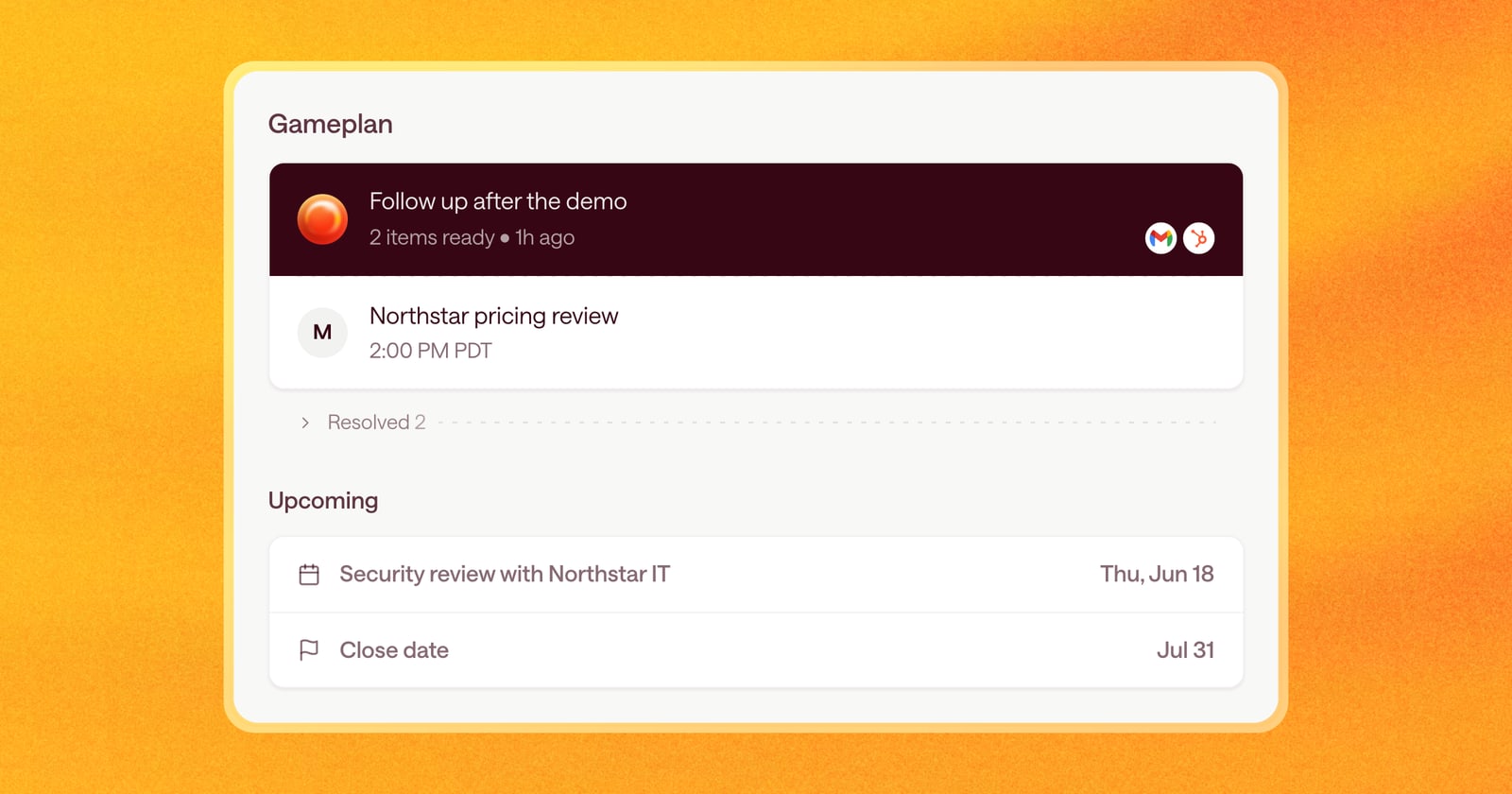
A gameplan is a list of steps on the left side of every deal. Each step has a clear goal, like “Send the recap and pricing after the demo” or “Confirm the security review with IT,” and a date.
Arrows builds the plan from three things:
- Your playbook. The way your team sells: stages, what has to be true before a deal moves forward, and what a good follow-up looks like.
- The deal so far. Emails, meetings, notes, and calls from your CRM.
- What’s coming up. Upcoming meetings show in the gameplan next to the steps, so you see the deal’s next few days in one place.
The work lives inside the step
This is the biggest change from how Arrows worked before.
Until now, the work Arrows prepared showed up in chat. You asked for a follow-up email, Arrows wrote one, and the draft scrolled away with the rest of the conversation.
Now the work sits inside the step it’s for. Open “Follow up after the demo” and you’ll find the email draft, the CRM updates, and anything else that step needs, ready for you to review. Approve it, edit it, or ask for changes, and the step moves forward.
That means two things for your day:
- You can see what needs you. Steps waiting on your review are gathered in your Sales Workspace, so nothing gets lost in a chat thread.
- You can see what’s already done. Finished steps stay on the plan, so anyone looking at the deal knows what has happened and what’s next.
The plan keeps itself current
A gameplan isn’t a one-time checklist. When something happens on the deal, Arrows revisits the plan:
- A meeting gets booked, moved, or finished.
- A buyer replies to an email.
- A note or call is logged in your CRM.
If the plan needs to change, Arrows changes it. If a step needs new work, like a recap after a call, Arrows prepares it and puts it in the step.
Getting started
Gameplans are on for every deal with an Arrows space. Open any deal and you’ll see its gameplan on the left. To change how Arrows plans, update your playbook: the gameplan follows it.