


HubSpot Projects 2026: Complete roadmap & strategy guide from the product manager
Learn how HubSpot is building project management for go-to-market teams in 2026, including the complete roadmap, strategic positioning, and how to use projects with Arrows for customer onboarding.

Steal this cheat sheet to run CS in HubSpot
Not sure where to start? Download the 7 playbooks you need to scale across the customer journey.
You'll also be subscribed to the Happy Customers newsletter.
Introduction
In December 2025, we hosted an exclusive webinar with Mark Miller, the HubSpot product manager responsible for the new projects object. Mark walked through the current state of Projects, shared the strategic thinking behind HubSpot's decisions, and revealed the roadmap for 2026.
This guide captures everything from that conversation - the use cases HubSpot is prioritizing, how they're thinking about competition with tools like Asana, ClickUp, and Monday.com, and specific timelines for upcoming features.
If you're evaluating whether to use Projects for your team, planning your implementation, or advising clients on their HubSpot setup, this guide gives you the context you need to make informed decisions.
A note on timelines: The roadmap information in this guide comes from Mark's December 2025 estimates. These are early projections and things can shift as development progresses. Consider this directional guidance on where HubSpot is headed with Projects.
Why HubSpot built the projects object
HubSpot launched the projects object in September 2025 at their INBOUND conference. The decision came from observing a consistent pattern: teams were starting work in HubSpot, then having to jump to another tool to finish that work.
For example, a sales team closes a deal in HubSpot, then the post-sale team moves to Asana to manage the delivery project. A marketing team plans a campaign in HubSpot, then shifts to Monday.com for execution. The constant context switching creates friction and data silos.
Mark explained the strategic rationale: "For certain use cases such as service delivery or post-sales, having access to your customer data is really important for pairing that with the project you're going to manage. Your teams are already in HubSpot. By bringing these projects into HubSpot, you now can go from a lead to a customer set of data within one place."
The evolution from service object to projects
Before projects existed, HubSpot launched the service object about a year earlier. But as the team thought more about different project management use cases, they realized service was too narrow.
"The service object is really a subset of a use case for a project," Mark said. "There's a bunch of different use cases for project management, one of which is service delivery. A more generic object like a project is a better direction."
HubSpot is now investing primarily in projects. They're considering options for the service object, including sunsetting it, renaming it, or determining if there's a distinct use case that justifies keeping it separate.
The clearest signal of this shift: the customer success workspace recently renamed its "Service" tab to "Projects," and projects is now the default recommended object in that workspace.
What this means for current service object users: Evaluate when to migrate to projects. HubSpot hasn't announced a forced migration timeline, but the investment and development is clearly flowing to rojects.
The 3 primary use cases HubSpot is solving for with projects
HubSpot isn't trying to be everything to everyone with projects. They're focused on three specific use cases that align with their core personas: marketing, sales, and service teams.
1. Service delivery
This is the broadest category and includes:
Software onboarding - Moving customers from closed deal to successful implementation. For B2B SaaS companies and software providers, this typically means coordinating internal tasks (account setup, configuration, training prep) with customer-facing tasks (completing forms, uploading information, scheduling kickoff calls).
Professional services - Solution partners and agencies managing client deliverables. This includes implementation projects, consulting engagements, and ongoing service delivery where you need to coordinate work between your team and the client.
Physical goods delivery - Manufacturing and delivery processes. Mark mentioned a customer doing restaurant signage production as an example of how projects can track the full lifecycle from order to delivery.
Service delivery projects typically have repeatable processes, multiple stakeholders (internal team + external customer), and clear milestones from start to completion. Tools like Arrows integrate with projects to create the customer-facing layer for any of these service delivery use cases while your team manages the internal project work in HubSpot.
2. Marketing campaigns
Marketing teams already use HubSpot to execute campaigns, but they haven't had good project management tools within the platform. Marketing campaigns often need task coordination across multiple people, timeline tracking, and the ability to connect campaign execution back to performance data.
HubSpot is building projects into Marketing Studio (their new campaign management interface) so marketers can plan, manage, and report on campaigns without leaving HubSpot.
3. Sales & account management
For complex, upmarket sales processes, teams need containers for strategic work:
Enterprise strategic sales projects - Coordinating the activities and stakeholders involved in closing large deals
Annual account plans - Organizing the ongoing relationship management and growth initiatives for key accounts
These projects connect directly to the deal and company records teams are already managing in HubSpot.
Why these three?
Mark was direct about the focus: "These use cases are really just an extension of those personas. We've always been going after marketing, sales, and service personas. It's not really a big departure from where HubSpot has traditionally succeeded."
This focus also explains what HubSpot is not prioritizing - internal departments like product, design, and engineering. Those teams don't have strong reasons to do their project management in HubSpot because they're not working with the customer data and go-to-market tools that make HubSpot valuable.
HubSpot's positioning: projects vs. dedicated project management tools
One of the most common questions about projects: Is HubSpot trying to replace Asana, ClickUp, or Monday.com?
Mark's answer was refreshingly honest: "HubSpot is never going to have the feature depth that a software like Asana or ClickUp has. We're really solving for a common denominator of requested features that hopefully can enable many customers to use this use case."
The "common denominator" strategy
HubSpot is building the core project management capabilities that most go-to-market teams need for their specific use cases. They're not trying to match the advanced features that dedicated PM tools offer for technical teams or complex enterprise programs.
"What we're trying to do is we are going after use cases that are relevant for some of the existing personas that use HubSpot and trying to provide them the set of capabilities that they need to be able to accomplish that use case in HubSpot without leaving," Mark explained.
When to use HubSpot projects vs. external tools
Use HubSpot projects when:
- Your project management is tied to customer data already in HubSpot
- Your team already works primarily in HubSpot daily
- You want a unified view from lead → customer → project → outcome
- The project types match HubSpot's three core use cases
- You need basic-to-intermediate project management features
Use dedicated PM tools when:
- You need advanced features like complex resource allocation or portfolio management
- Your projects involve internal teams (product, engineering) who don't use HubSpot
- You have highly specialized workflows that require deep customization
- Your enterprise requires the specific capabilities that tools like Asana provide
Integration plans
HubSpot recognizes that many teams will continue using other tools. They're building integrations to make that work smoothly:
Live now: Data sync with Monday.com (built by HubSpot)
In progress: Bi-directional integration with Asana (being built by Asana to sync projects and tasks between the platforms)
Being discussed: Integration with ClickUp
Not in the plans: Jira integration. Mark explained that Jira serves personas (product managers, engineers) that aren't HubSpot's current focus. "It will take a lot of change in terms of the evolution of HubSpot and project management to say why would a product manager or an engineer use HubSpot instead of Jira."
The integration strategy makes it clear: HubSpot wants to be the project management tool for your go-to-market teams, while acknowledging that other teams in your organization may need different solutions.
Current capabilities & the Gantt view
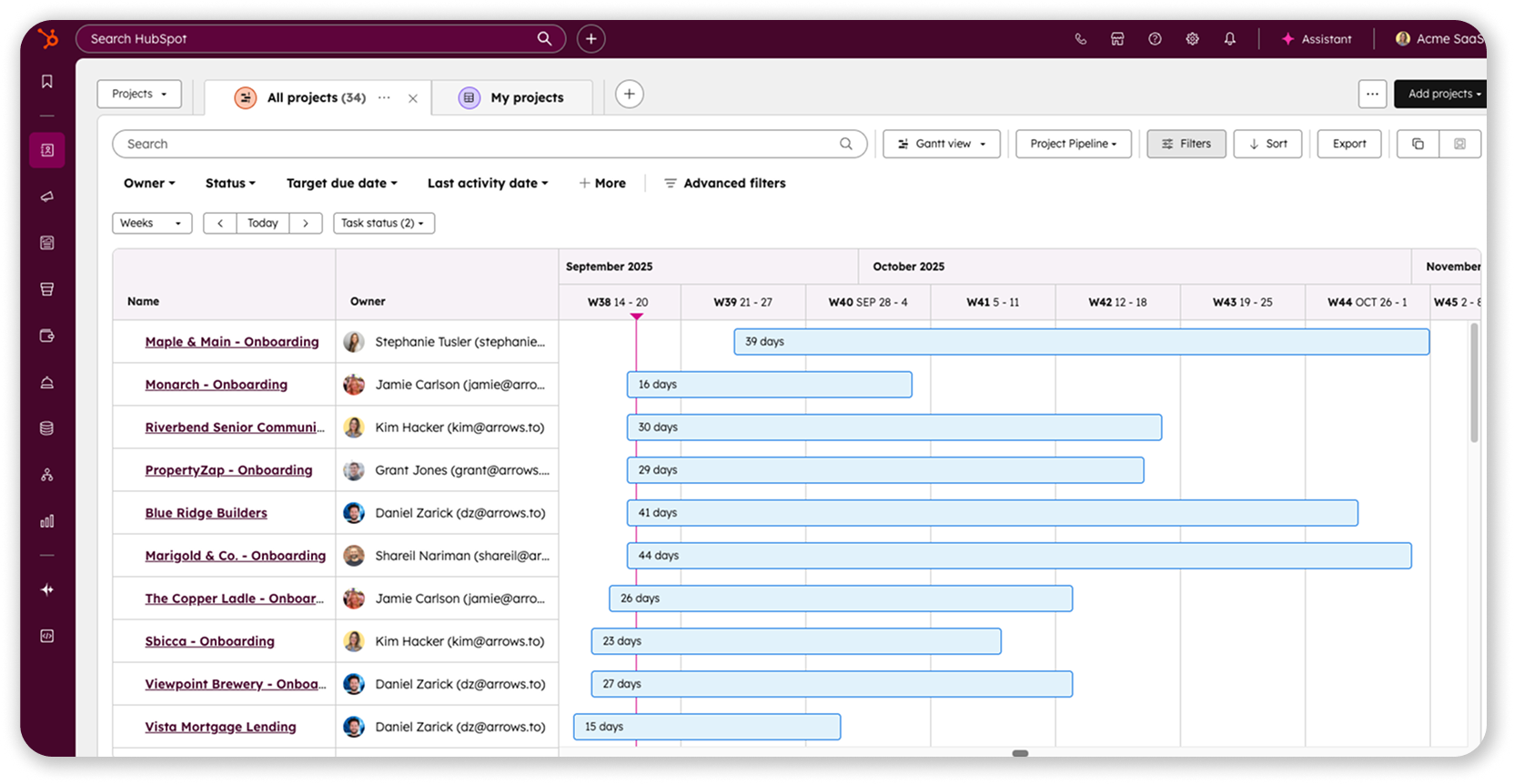
Projects launched in September 2025 as a new CRM object along with the Gantt view, which Mark identified as the most requested feature from early users.
Available views
Projects supports four different views, each suited to different workflows:
Gantt view - Timeline visualization showing project duration and task dates. You can drag to adjust dates directly on the timeline. The Gantt view entered public beta in December 2025 and is rolling out to all customers in January 2026.
Board view - Kanban-style cards organized by pipeline stages. Good for seeing status at a glance and moving projects through stages.
Table view - Spreadsheet-like format with customizable columns. Best for bulk editing and data-heavy analysis.
Calendar view - Monthly calendar showing when projects are scheduled. Useful for capacity planning and identifying scheduling conflicts.
All views are available for projects, deals, tickets, and services objects.
Task management
Projects connect directly to HubSpot tasks, which is critical for actual project execution. You can:
- Create tasks within a project record
- View all project tasks in the Gantt view
- Adjust task due dates by dragging them on the timeline
- See which tasks are blocking progress
Tasks in projects work the same way as tasks elsewhere in HubSpot - they can be assigned to team members, have due dates, and trigger workflow automations.
Customer Success workspace integration
Projects now appears in the Customer Success workspace in Service Hub. The workspace was recently updated to rename the "Service" tab to "Projects" and make projects the default object for managing customer work.
This integration means CS teams can see projects alongside customer health scores, support tickets, and communication history - all the context they need to manage onboarding and ongoing customer success.
Workflow automation
You can use HubSpot workflows to automatically create projects. The most common pattern for onboarding: when a deal moves to "Closed Won," trigger a workflow that creates a project, associates it with the customer's company record, and assigns it to the appropriate team member.
Once project templates launch (more on this in the roadmap section), workflows will be able to create projects from templates, automatically generating all the associated tasks.
Activation and access
Projects is available to all HubSpot customers, including free users. There are no specific hub purchases required to use the basic projects object.
To create or edit projects, users need a core seat (consistent with how all CRM objects work in HubSpot). View-only seats can see project information but can't make changes.
Some advanced features have additional requirements:
- Using projects in the CS workspace requires Service Hub Pro or Enterprise
- Using projects in Marketing Studio (when available) requires Marketing Hub Pro or Enterprise
To activate projects in your portal:
- Go to Settings → Data Model
- Click "Edit data model"
- Find projects and click "Activate object"
- Projects will then appear in your CRM navigation
Using projects for customer onboarding with Arrows
Projects handles internal project management well, but customer onboarding requires a two-layer approach: your internal team needs to track all the work happening, while your customers need a clean, simple view of what's expected of them.
This is where Arrows comes in. Arrows was the first app to integrate with the projects object, and it creates the customer-facing onboarding experience that connects directly to your internal HubSpot project management.
How the integration works
The most common workflow we see starts with your standard deal close:
- A deal moves to "Closed Won" in HubSpot
- A workflow automatically creates a new "Onboarding" project
- Another workflow creates an Arrows onboarding plan that connects to that project
- Your customer sees the Arrows plan - a clean interface showing only what they need to do
- Your team sees the full project in HubSpot with both customer-facing tasks and internal work
Connecting customer actions to internal tasks
Arrows includes task completion actions that let you build your internal workflow based on what customers do. Here's how it works in practice:
Example 1: Customer uploads trigger internal work
- Customer completes "Upload your company logo" in Arrows
- Arrows automatically creates a task in the HubSpot project: "Review logo and add to account"
- Your designer gets assigned the task and knows exactly what to do next
Example 2: Sequential dependencies
- Customer completes "Sign service agreement" in Arrows
- Arrows creates "Provision production environment" task in HubSpot
- Your ops team starts the technical setup, knowing the contract is signed
Example 3: Collecting information
- Customer fills out "Technical requirements form" in Arrows
- Form data syncs to HubSpot project properties
- Your implementation team sees the technical specs directly in the project record
What gets synced between Arrows and projects
The integration is bi-directional and comprehensive:
From Arrows to HubSpot:
- Task completion status
- Who completed each task and when
- Files uploaded by customers (attached to the project record)
- Form field responses (mapped to project properties)
- Comments added to the onboarding plan
- Plan progress metrics (percentage complete, tasks overdue)
- Participant engagement data
From HubSpot to Arrows:
- Project properties (like target completion date, project owner)
- Custom properties you've configured (can be used to personalize the onboarding plan for each customer)
When to use projects alone vs. projects + Arrows
Use projects alone when:
- Running purely internal projects (no customer interaction needed)
- Managing marketing campaigns or internal strategic initiatives
- Coordinating work between internal teams only
Use projects + Arrows when:
- Onboarding customers to your software or service
- Managing professional services engagements with client collaboration
- Any project where customers need to complete tasks, upload files, or provide information
- You want customers to see their progress without giving them HubSpot access
Key Arrows features for customer onboarding
Form collection - Embed forms directly in onboarding tasks. Responses sync to HubSpot properties on the project, company, or contact records. Customers stay in Arrows instead of jumping to separate forms.
File uploads - Customers upload documents, images, or other files as part of their tasks. Files automatically attach to the project record in HubSpot for your team to access.
Task completion actions - A core automation feature. When a customer completes any task in Arrows, trigger actions in HubSpot: create tasks, update properties, move the project to a new stage, send notifications, or start workflows.
Meeting scheduling - Embed scheduling links from HubSpot Meetings, Calendly, or other tools directly in tasks. Customers book calls without leaving the onboarding plan.
Real-time progress tracking - As customers work through their Arrows plan, you see progress updates in the project record. No need to ask "where are we?" - you can see completion percentage, overdue tasks, and who's actively engaged.
Setting up the integration
Arrows integrates with HubSpot projects the same way it works with deals, tickets, services, and custom objects. Once you've activated projects in your HubSpot portal:
- Connect an Arrows plan to the projects object
- Configure which Arrows engagement properties should sync to HubSpot projects
- Set up task completion actions for customer tasks
- Use workflows to automatically create both the project and Arrows plan when deals close
Arrows was the first app to integration with projects, and we already have many customers using projects with Arrows to manage their customer onboarding process, taking advantage of the Gantt view for internal timeline planning while keeping the customer experience simple and focused through Arrows.
2026 roadmap: What's coming and when
Mark was transparent about what HubSpot is building and when teams can expect features to launch. These timelines are estimates from December 2025 - treat them as directional guidance rather than firm commitments.
The overarching goal for 2026: build the foundational project management capabilities that teams need to actually run their service delivery and marketing campaign projects in HubSpot.
Q1 2026 (January - March)
Subtasks (Beta: January 2026)
Currently, projects has two levels: projects and tasks. Subtasks add a third level, letting you break tasks into smaller steps.
In the Gantt view, you'll see projects → tasks → subtasks, with the ability to collapse and expand each level. You'll be able to create subtasks directly from the project record by clicking a plus button next to any task.
This matters for complex onboarding or campaign projects where tasks like "Complete account setup" actually involves 5-10 distinct steps.
Status updates (Beta: January 2026)
Status updates let you post information about a project's progress and share it with stakeholders - both internal team members and external contacts.
You'll see a new card in the project record where you can create status updates. HubSpot will send notifications to HubSpot users and provide easy options to email the update to associated contacts.
For onboarding projects, this means you can send progress updates to customers without leaving HubSpot or manually drafting emails.
HubSpot is also building an AI-generated version of status updates. The AI will review recent activity on the project and draft an update for you to review and send.
Activity associations (Expected: January - February 2026)
Currently, emails and meetings logged in HubSpot automatically associate to contacts, companies, and deals based on settings. Projects isn't included in those automatic associations yet.
HubSpot is adding projects to the activity associations settings, which means emails and meetings with project-related contacts will automatically show up in the project timeline.
This solves a major pain point: you won't have to manually associate every customer email to the onboarding project.
Q2 2026 (April - June)
Task dependencies (Beta: March/April 2026, GA: Summer 2026)
Dependencies let you indicate that one task shouldn't start until another task is finished. This is standard project management functionality that projects currently lacks.
You'll be able to create and manage dependencies when creating or editing tasks. More importantly, dependencies will be visualized in the Gantt view - you'll see arrows connecting dependent tasks and be able to drag and drop to create new dependencies directly on the timeline.
Critical path analysis (Evaluating for GA)
Once dependencies exist, HubSpot is considering adding critical path visualization. The critical path is the sequence of dependent tasks that determines the minimum time needed to complete a project.
Mark indicated this probably won't be in the initial beta of dependencies (March/April) but is being evaluated for the GA release in summer 2026.
Project templates (Beta: April 2026)
Templates are one of the most requested features, especially for repeatable processes like onboarding.
Instead of manually creating 20-30 tasks every time you start an onboarding project, you'll create a template that predefines all those tasks. When you create a new project from the template, all the tasks are automatically generated.
Templates will work both for manual project creation and workflow automation. When you set up a workflow to create a project, you'll be able to specify which template to use.
Initially, templates will focus on predefining tasks. Mark noted that predefining property values (like project owner or priority) is "something we will explore over time" but isn't part of the initial beta.
H2 2026 (July - December)
Custom task properties
Right now, tasks have standard HubSpot properties. Custom properties will let you add fields specific to your process.
For service delivery, you might want a property for "customer approval required" or "external dependency." For marketing campaigns, you might need "campaign channel" or "asset type."
No specific timeline was given beyond "second half of 2026."
Resource management capabilities
HubSpot is exploring two major resource management features:
Time tracking - Log hours spent on tasks and projects. This is critical for professional services teams who bill by the hour or need to understand the actual cost of delivery.
Workload view - See how work is distributed across your team. Identify who's overloaded and who has capacity for new projects.
Both features are in the exploration phase, likely targeting late 2026 for beta releases.
Forms integration
Currently, HubSpot forms can update contacts, companies, and a few other objects. They can't create or update projects yet.
HubSpot is in discussions with the forms team about extending this capability to projects (and also to deals, another frequently requested feature).
This would let you capture information through a form and have it automatically create a project or update project properties. Useful for intake processes or customer-submitted requests.
Milestones (Late 2026)
Milestones mark significant points in a project's timeline - completing a phase, hitting a deadline, or achieving a key deliverable.
Mark categorized milestones as "probably like the next tier" of requests after subtasks and dependencies. HubSpot views them as important core functionality that should exist, targeting late 2026 for development.
Should you switch to HubSpot projects?
If you're currently using the services object, the question is when to migrate, not if. HubSpot's investment is clearly flowing to projects, and they're actively considering sunsetting the services object.
Migrate now if:
- You're starting a new implementation and want to build on the object HubSpot is actively developing
- You want to participate in betas for upcoming features
- Your use case extends beyond pure service delivery (campaign management, strategic sales)
- You're setting up customer onboarding and want to integrate with tools like Arrows
Wait to migrate if:
- You have complex automations built on the services object that would be difficult to rebuild
- You need features that are coming in Q2-H2 2026 and can't work around them
Start testing if:
- You're evaluating whether HubSpot projects can replace your current external PM tool
- You're designing your onboarding or campaign management process from scratch
- You want to influence the roadmap by providing beta feedback
Getting started
Projects works like other HubSpot CRM objects. If you're comfortable with deals or tickets, you'll pick up projects quickly.
Activate the object in your Data Model settings, create a few test projects, and experiment with the different views. The Gantt view is in public beta - enroll through Product Updates if you don't see it yet.
For a detailed walkthrough of setup and configuration, see our foundational guide: Everything You Need to Know About HubSpot's Projects Object.
Conclusion
HubSpot projects is still early, but the direction is clear. HubSpot is building project management specifically for go-to-market teams who need to connect their projects to customer data and complete their work without leaving HubSpot.
The 2026 roadmap addresses the core capabilities teams need: subtasks for breaking down work, dependencies for sequencing tasks, templates for repeatable processes, and eventually resource management for understanding capacity.
Mark's transparency about positioning was valuable - HubSpot isn't trying to "out-feature" Asana or ClickUp. They're solving for the common project management needs of marketing, sales, and service teams who already live in HubSpot.
If your projects fit those use cases and you value having everything in one platform, projects is worth testing now and monitoring as features roll out through 2026. For customer onboarding specifically, combining projects with Arrows gives you both the internal project management and customer-facing experience you need. The roadmap Mark sOkay, this is really great, thank you. Now could you also please write up a short description for the header on the page? I'll show you what I did. This is what we had for the tickets guide, so something similar in structure like this but for the projects guide, please.hared gives you the visibility to plan your implementation around when critical features will be available.
Steal this cheat sheet to run CS in HubSpot
Not sure where to start? Download the 7 playbooks you need to scale across the customer journey.
You'll also be subscribed to the Happy Customers newsletter.